
"At the end of every financial month, how many hours does your accounting team waste reconciling CSV spreadsheets against bank merchant settlement statements?"
Retail merchants and cafe operators routinely use cloud accounting platforms like QuickBooks Online and Xero, or local packages like SQL Account and AutoCount. These are accounting tools, not point-of-sale systems — so businesses still need a way to get sales data from the register into the ledger. The common approaches are:
- Manual nightly CSV exports: End-of-day spreadsheet dumps that are prone to date-format mismatches, truncated SKU strings, and mismatched receipt sequences.
- Third-party sync middleware: Connectors (e.g. Zapier-style integrations) that bridge the POS and the accounting platform — pricing and reliability vary by connector, so check current terms with whichever middleware you use.
- Manual tax classification: Matching frontend sales categories to the right Sales and Service Tax (SST) ledger accounts can take extra review, regardless of which accounting platform you use.
GeminiPOS takes a different approach for merchants who want this built in: an embedded native real-time double-entry general ledger, included from the Growth plan.
---
1. CSV/Middleware Workflow vs Native Double-Entry Accounting
!Retail Accounting: CSV/Middleware Workflow vs Native Real-Time Ledger
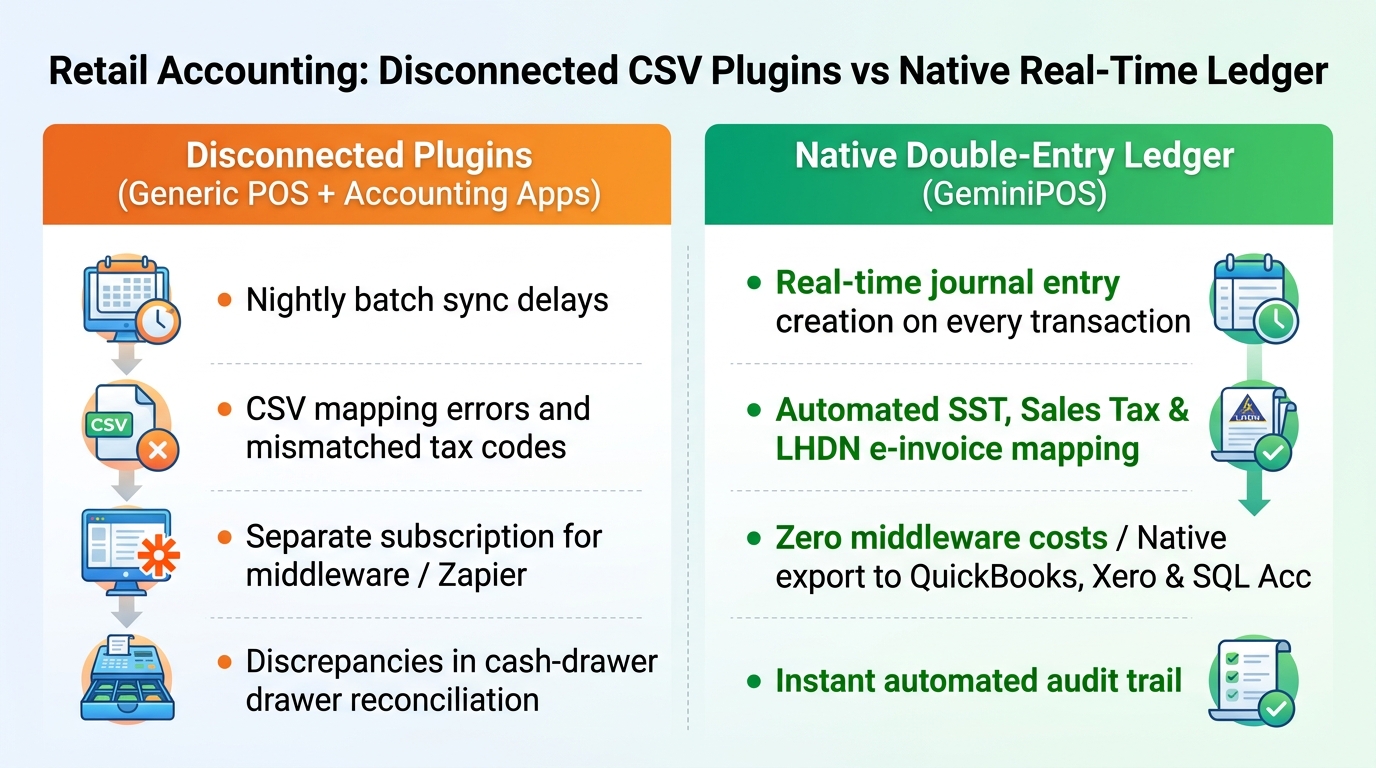
- Typical setup (POS + separate accounting software):
- The POS records sales; a separate export or sync step moves that data into QuickBooks, Xero, or another ledger.
- Nightly batch exports summarize sales into lump-sum entries. Complex transactions — split tenders, partial refunds, gift card redemptions — can be harder to reconcile this way.
- Reconciling cash drawers against bank feeds is a manual task for the accounting team, since the POS and ledger are separate systems.
- GeminiPOS native architecture (Growth plan and up):
- Every completed transaction writes a double-entry journal entry directly inside GeminiPOS:
- *Debit: Cash Drawer / Merchant Settlement (Asset)*
- *Credit: Merchandise Sales Revenue (Income)*
- *Credit: SST Payable (Liability)*
- *Debit: Cost of Goods Sold — COGS (Expense)*
- *Credit: Inventory Asset Account (Asset)*
- Because the POS and ledger are the same system, there's no separate export/import step for day-to-day sales bookkeeping.
---
2. If You Still Want to Export to Xero, QuickBooks, or SQL Account
GeminiPOS's double-entry ledger is built in, but if your accountant prefers to keep using Xero, QuickBooks, AutoCount, or SQL Accounting for annual filing or audits, check with GeminiPOS support on current export formats for your setup — and check with QuickBooks/Xero directly on whether their SST and e-Invoice features meet your compliance needs, since requirements vary by business.
---
3. Feature Comparison: GeminiPOS Native Ledger vs a Typical POS + Separate Accounting Software Setup
Financial Management Dimension · GeminiPOS Native Ledger (Growth/Pro) · Typical POS + Separate Accounting Software
Journal entry generation · Real-time, per transaction · Depends on your export/sync schedule — often nightly batch
Ledger engine · Native double-entry, built into the POS · Separate accounting software (e.g. QuickBooks, Xero)
Sync/connector fees · Included — no separate connector needed · Varies by connector/accounting plan — check current pricing with your provider
Drawer reconciliation · Automated audit trail within the POS · Manual reconciliation between POS and accounting records
SST tax classification · Pre-mapped ledger accounts within GeminiPOS · Check with your accounting software on current SST handling
Real-time P&L reporting · Live on the GeminiPOS dashboard · Depends on your accounting software's reporting cadence
---
4. Simplify Your Retail Accounting Today
Turn your POS counter into a system that keeps its own books:
- Download GeminiPOS from the Google Play Store.
- Contact our team for guidance on chart-of-accounts setup:
👉 WhatsApp: +60 11-3925 8326


---
> 💡 Related Guide: Discover the complete feature overview, local-first offline architecture, and multi-outlet workflows of our flagship POS system in Malaysia built for modern retail and F&B businesses.