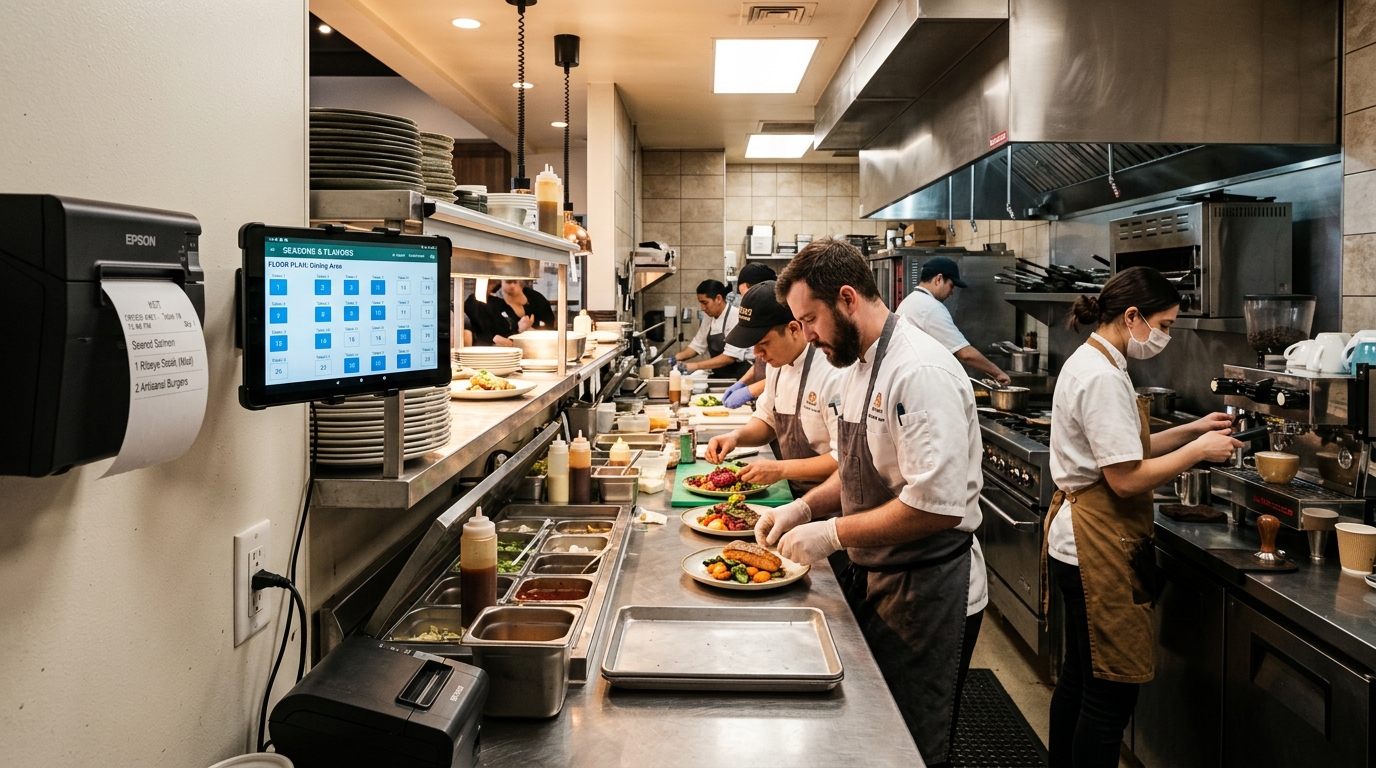
Lunch and dinner peak hours in any bustling restaurant, bistro, cafe, or casual eatery are high-stakes operational environments. When dozens of guests arrive simultaneously, communication breakdowns between front-of-house servers and back-of-house kitchen crew can quickly escalate into a nightmare:
- Handwritten carbon-copy order dockets get lost or soaked by grease and water.
- Table 8 receives a spicy tom yum soup when they specifically requested zero chili for their children.
- The beverage barista remains completely unaware of pending drinks because the floor server is still queuing to manually communicate food orders to the chef.
- Food cools down on the pass counter because waitstaff cannot decipher illegible table numbers.
These friction points directly degrade customer satisfaction, increase food wastage, and depress table turnover rates.
The battle-tested solution in modern restaurant hospitality is Automated Kitchen Order Ticket (KOT) Routing powered by a responsive, multi-station point-of-sale system.
---
1. What is a Kitchen Order Ticket (KOT)?
A Kitchen Order Ticket (KOT) is an automated operational slip printed directly in food preparation zones the moment an order is confirmed on a floor tablet or placed by diners at a self-ordering kiosk.
Unlike customer tax invoices, a KOT is engineered strictly for culinary production:
- Table Identification & Section: (e.g. *Table 14 - Indoor AC Area*).
- Sequential Order Number & Timestamp: Guarantees strict *First-In, First-Out (FIFO)* preparation discipline.
- Item Modifiers & Custom Cooking Instructions: Explicit culinary instructions (e.g., *"Ribeye Steak - Medium Rare, Truffle Mash, Sauce on the Side"* or *"Iced Americano - Oat Milk Substitute, No Sugar"*).
- Server Identifier: Identifies the attending staff member should the kitchen need immediate verbal clarification.
---
2. GeminiPOS Smart Order Routing Architecture
GeminiPOS eliminates physical legwork by intelligently distributing line items across preparation stations instantly:
!Restaurant Smart POS Kitchen Routing System Diagram
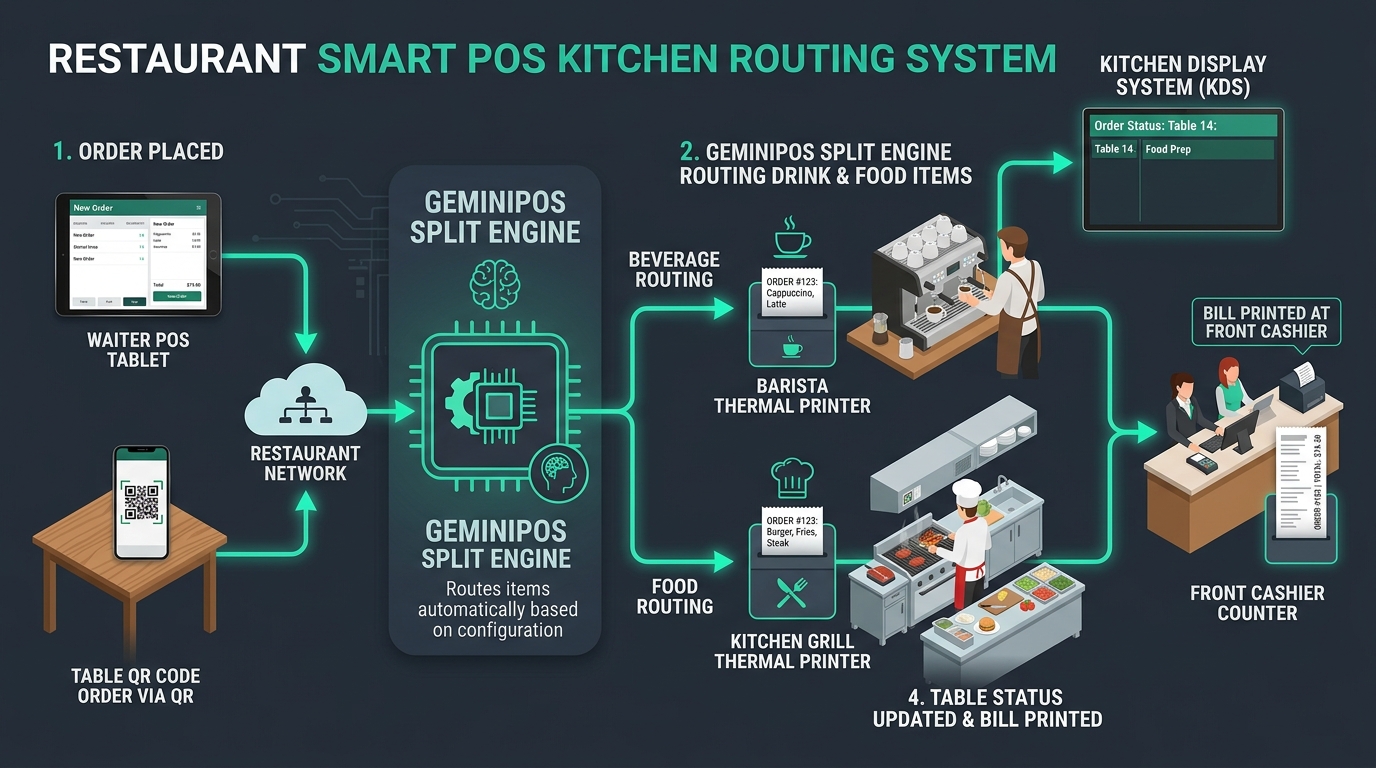
Step 1: Multi-Channel Order Ingestion
Waitstaff capture table orders directly beside guests using handheld Android terminals or smartphones. Counter-service outlets can also let guests order at a self-ordering kiosk instead of queueing.
Step 2: Intelligent Routing Engine (Smart Split)
Upon tapping "Send to Kitchen", the GeminiPOS routing engine categorizes the cart payload in real time:
- Bar & Beverage Items: Dispatched instantly to the Barista thermal printer.
- Hot Food & Mains: Routed immediately to the heavy-duty hot kitchen printer.
- Grill / Cold Appetizer Stations: Sent to specialized prep zones if configured.
Step 3: Synchronized Preparation
Baristas prepare beverages while chefs fire hot pans simultaneously. Drinks often arrive at guest tables within minutes of sitting down, establishing positive hospitality sentiment early.
Step 4: Live Table Status & Instant Checkout
The POS floor plan dynamically transitions table status from *"Seated"* to *"In Prep"* to *"Served"*. When guests are ready to depart, the cashier simply taps the table icon to generate an itemized bill without manual re-keying.
---
3. Hardware Selections: Why Kitchens Require Wired Ethernet LAN Printers
A frequent mistake made by new restaurant operators is attempting to deploy Bluetooth thermal printers inside commercial kitchens.
Commercial kitchens are harsh operating environments packed with solid stainless steel benches, high-voltage induction chillers, and industrial exhaust hoods. These elements severely attenuate 2.4GHz Bluetooth signals, leading to frequent packet drops, missed tickets, and chaotic "lost order" scenarios during busy shifts.
For kitchen reliability, Hardwired Ethernet (LAN) Thermal Printers (80mm) are the enterprise standard:
- Wired Ethernet Stability: Category 6 network cabling guarantees zero signal loss regardless of kitchen architecture or electromagnetic interference.
- Audible Kitchen Buzzers & Warning LEDs: High-decibel external alarm buzzers ensure kitchen staff hear incoming tickets over the roar of woks and extraction fans.
- Water and Oil Resistant Enclosures: Purpose-built commercial kitchen printers feature internal baffles that protect thermal print heads from grease and humidity.
---
4. Why Food & Beverage Operators Rely on GeminiPOS
GeminiPOS was built from the ground up to handle high-tempo hospitality environments:
- Offline-First Resilience: Even if external public internet drops out, local Wi-Fi and LAN routing between order tablets and kitchen printers continues operating flawlessly.
- Hierarchical Modifier Groups: Enforce mandatory choices (portion size, cooking temperature) and optional add-ons with automated inventory deductions.
- Split Bills & Table Transfers: Easily merge tables, move guests from outdoor patio to dining room, or split payment between multiple corporate guests in seconds.
---
5. Summary & Implementation Advice
Automating your kitchen order tickets eliminates communication bottlenecks, stops kitchen disputes, and improves table turnaround velocity by up to 30%.
> Ready to modernize your restaurant or cafe operations?
> Discover how GeminiPOS streamlines counter sales and kitchen workflows.
> Schedule an F&B Consultation or review our Restaurant Pricing Options.
---
> 💡 Related Guide: Discover the complete feature overview, local-first offline architecture, and multi-outlet workflows of our flagship POS system in Malaysia built for modern retail and F&B businesses.